Keep Christmas product shot selected
This look takes one photo of one product and adds no people.
Upload one photo of your product and get a warm, festive shot ready for your shop or ads.
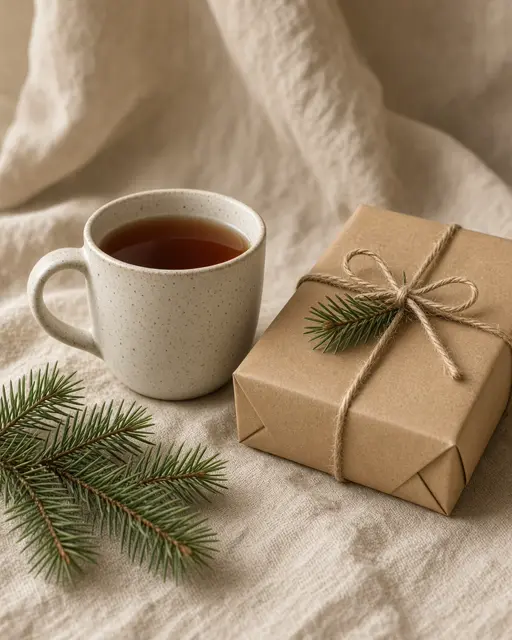
Christmas product shot: Linen, pine and warm light around your own product.
10 creditsFree with sign-up · 1 watermarked photo · ~40 s
Product · Add photo
 6 / 6
6 / 6Placeholder art — real VibePico examples are on the way
This look takes one photo of one product and adds no people.
Shoot it straight on, in daylight, with the whole item in frame and the label readable.
It takes about 40 seconds. Use Square for feeds, Story for vertical ads, Landscape for banners.
A seasonal product shoot means props, styling and a free afternoon, all at the busiest time of the year. This Christmas product photography AI needs one clear photo of your product. It places the item on a cream linen cloth with fresh pine sprigs and a kraft gift box, under warm window light, with clean space around it for ad copy.
The generator is told to keep the product’s shape, proportions, colors, materials and label as they appear in your photo. It works best for simple physical goods like candles, mugs, skincare, jars and small gifts.
The background, the props and the lighting are created for the Christmas scene.
Your product’s shape, colors, materials and label are kept as in the reference photo.
A studio shoot is still the right choice for hero images on a big campaign, where you need several angles, exact color and full control over props. For a small shop, though, a seasonal shoot is often skipped altogether because of the cost and the timing. Christmas images need to go live before the rush, which is exactly when a small team has the least time. Christmas product photography AI fills that gap by making one festive image from a photo you already have.
Every image from this page uses the same styled scene: cream linen, fresh pine, a kraft gift box and warm window light. That consistency can be useful. Run it across a few products and your Christmas range starts to look like a single collection, without you having to rebuild the set each time. Plain, natural props also suit most small brands better than loud red and gold, and they leave clear room for your own headline.
Treat the output as a marketing image, not as proof of what the product looks like. Keep at least one true product photo in every listing so that buyers can see the real item. If you sell food, cosmetics or anything with regulated wording, keep the legal details in your listing text and your real packaging photos, not in an AI image.
You need many angles, accurate color matching or a large campaign.
You need one seasonal image today for a listing, an email or a social ad.
One seasonal image can refresh several sales channels at once without a new shoot.
Swap a seasonal image into your Etsy, Shopify or Amazon gallery for December.
The empty space around the product leaves room for your headline and offer.
Landscape 16:9 fits a Christmas email header or a homepage banner.
The output is only as accurate as the input, so a sharp and well-lit source photo is the most important step.
A white wall or sheet of paper makes the edges of the product easy to read.
One product gives the cleanest result. Remove other items from the frame.
Blurred label text is more likely to come out changed.
AI can alter small print or logos. Check every detail so your listing shows what buyers will get.
The image has no headline, price or logo. Add those in your ad or design tool.
Marketplaces and ad platforms have their own rules on AI images. Check them before you publish.
A new account gets 10 free credits, which make one watermarked 1K image. After that each image costs 10 credits and comes out at 2K with no watermark; paid plans can make 2 or 4 variations at once. If an image fails on our side it is retried once and then the credits are refunded automatically.
Simple physical goods with a clear shape work best, such as candles, mugs, jars, skincare and small gifts.
The generator is told to keep your label, but AI can still alter small text. Check it closely, especially ingredients and legal wording.
No. This look is a styled still life and adds no people or hands.
Pick Story 9:16, Portrait 4:5, Square 1:1 or Landscape 16:9 before you generate. Each finished image can be downloaded as a PNG or a JPG.
Uploads are private and used only to make your picture. Uploaded photos are deleted after 24 hours. Results stay in My photos until you delete them.
Tools, trends, prompts and scenes that go with this page.